Showing posts with label libwebsockets. Show all posts

Friday, August 12, 2016

Part 5: Multiplayer WebSocket Game server written in C using libuv & libwebsockets & Cocos2d-x-HTML5

The Web Sockets Class is the class where the Requests / Responses are happening.
It using the native HTML5 Web Sockets interface / API .
All requests will process through this class and all response will process through this class also
All web-sockets validations / and function dispatching will also triggered from here .

Websockts.js
 
  1
  2
  3
  4
  5
  6
  7
  8
  9
 10
 11
 12
 13
 14
 15
 16
 17
 18
 19
 20
 21
 22
 23
 24
 25
 26
 27
 28
 29
 30
 31
 32
 33
 34
 35
 36
 37
 38
 39
 40
 41
 42
 43
 44
 45
 46
 47
 48
 49
 50
 51
 52
 53
 54
 55
 56
 57
 58
 59
 60
 61
 62
 63
 64
 65
 66
 67
 68
 69
 70
 71
 72
 73
 74
 75
 76
 77
 78
 79
 80
 81
 82
 83
 84
 85
 86
 87
 88
 89
 90
 91
 92
 93
 94
 95
 96
 97
 98
 99
100
101
102
103
104
105
106
107
108
109
110
111
112
113
114
115
116
117
118
119
120
121
122
123
124
125
126
127
128
129
130
131
132
133
134
135
136
137
138
139
140
141
142
143
144
145
146
147
148
149
150
151
152
153
154
155
156
157
158
159
160
161
162
163
164
165
166
167
168
169
170
171
172
173
174
175
176
177
178
179
180
181
182
183
184
185
186
187
188
189
190
191
192
193
194
195
196
197
198
199
var WebSocket = WebSocket || window.WebSocket || window.MozWebSocket; 

var MsgProtocolContainer =  function() 
{
 this.msgProtocol = new MsgProtocol();
 this.msgProtocolGems = new MsgProtocol();
}
var WebSocketNode = cc.Node.extend({
     m_wsiSendBinary:null,
     m_loginObj:null,
     m_GameLayer:null,
     m_msgProtocolContainer:null,
     ctor:function () {
         this._super(); 
         this.winsize = cc.winSize;
         this.m_msgProtocolContainer = new MsgProtocolContainer();        
     },
     init: function () {
        this.m_wsiSendBinary = new WebSocket("ws://127.0.0.1:7681/wsapi");
        this.m_wsiSendBinary.binaryType = "arraybuffer";
        this.m_wsiSendBinary.onopen = function(evt) {
            cc.log("Send Binary WS was opened.");
        };

        this.m_wsiSendBinary.onmessage = (function(evt) {
      var binaryUint8 = new Uint8Array(evt.data);
      var binaryStr = '';
      for (var i = 0; i < binaryUint8.length; i++) {
           binaryStr += String.fromCharCode(binaryUint8[i]);
      }
            // cc.log(binaryStr);
             this.handleServerResponse(binaryStr);


         this.m_wsiSendBinary.onerror = function(evt) {
             //this.m_loginObj.serverofflineLabel = 180;
            cc.log("m_wsiSendBinary Error was fired");
             if (cc.sys.isObjectValid(self)) {
                //self._errorStatus.setString("an error was fired");
                cc.log("an error was fired");
            } else {
                cc.log("WebSocket test layer was destroyed!");
            }
        };

        this.m_wsiSendBinary.onclose = function(evt) {
            cc.log("m_wsiSendBinary websocket instance closed.");
            self.m_wsiSendBinary = null;
        };
            
        }).bind(this);

       
         return true;
     },
     getMsgProtocol:function()
     {
      return this.m_msgProtocolContainer;
     },
     handleServerResponse:function(binaryStr)
     {
    var ResponseFromServer = Decode(binaryStr);
     
    //cc.log(Encode(ResponseFromServer));
     switch(ResponseFromServer.status)
     {
      case 1:
      {
       //cc.log(ResponseFromServer.player_id);
       this.m_msgProtocolContainer.msgProtocol.player_id = ResponseFromServer.player_id;
       if(ResponseFromServer.hasOwnProperty("players"))
       {
        this.m_msgProtocolContainer.msgProtocol.players = ResponseFromServer.players;
       }
       this.m_loginObj.switchToGame();
       break;
      }
      case 3:
      {
       this.m_GameLayer.syncPlayerActions(ResponseFromServer);
       break;
      }
      case 4:
      {
       this.m_GameLayer.AddOtherPlayerOnRegister(ResponseFromServer);
       break;
      } 
      case 5:
      {
       this.m_GameLayer.updateOtherPlayerOnMovment(ResponseFromServer);
       break;
      } 
      case 6:
      {
       this.m_GameLayer.deletePlayer(ResponseFromServer);
       break;
      } 
      case 7:
      {
       this.m_msgProtocolContainer.msgProtocolGems.simple_gems = ResponseFromServer.simple_gems;
       this.m_msgProtocolContainer.msgProtocolGems.bomb_gems = ResponseFromServer.bomb_gems;
       this.m_msgProtocolContainer.msgProtocolGems.status = ResponseFromServer.status;
       this.m_msgProtocolContainer.msgProtocolGems.player_id = ResponseFromServer.player_id;
       this.m_msgProtocolContainer.msgProtocolGems.utc_timestemp = ResponseFromServer.utc_timestemp;
       break;
      }       
     }
     
     },
     _stringConvertToArray:function (strData) {
         if (!strData)
         {
             return null;
         }

         var arrData = new Uint16Array(strData.length);
         for (var i = 0; i < strData.length; i++) {
             arrData[i] = strData.charCodeAt(i);
         }
         return arrData;
     },
     _stringConvertToUint8Array:function (strData) {
       
      // View the byte buffer as an array of 8-bit unsigned integers
      var arrData = new Uint8Array(strData.length);
      for (var i=0;i<strData.length;++i) {
          arrData[i] = strData.charCodeAt(i);
      }
      // Log the binary array
      //cc.log("SEND ARRAY BUFFER: " + arrData.buffer);
      return arrData;
     },

     sendMassage: function(reqJson,_obj)
     {
      this.setObjByStatus(_obj,reqJson,reqJson.status);

         if (this.m_wsiSendBinary.readyState == WebSocket.OPEN)
         {
            // cc.log("Send Binary WS is waiting...");
             var buf = Encode(reqJson);
             //cc.log("FROM CLIENT:"+buf);
             //console.log("PLAYER SEND:"+reqJson.player_name+" x:"+reqJson.player_x);
    //cc.log("PLAYER SEND X:"+reqJson.player_name+" x:"+reqJson.player_x);
    //cc.log("PLAYER SEND Y:"+reqJson.player_name+" y:"+reqJson.player_y);
             var binary = this._stringConvertToUint8Array(buf);
             if(reqJson.status==2)
       {
        var buf1 = Encode(reqJson);
            cc.log("FROM CLIENT reqJson.status==2:"+buf1);
       }
       else if(reqJson.status==8)
       {
      var buf1 = Encode(reqJson);
            cc.log("FROM CLIENT reqJson.status==8:"+buf1);
       }
             this.m_wsiSendBinary.send(binary.buffer);
         }
         else
         {
             var warningStr = "send binary websocket instance wasn't ready...try again in few seconds";
             cc.log(warningStr);
             this.init();
            
              
         }
     },
     setObjByStatus: function(_obj,_reqJson,_status)
     {
      switch(_status)
      {
       case 0 :
       {
        this.m_msgProtocolContainer.msgProtocol.player_name = _reqJson.player_name;
        
     this.m_msgProtocolContainer.msgProtocol.end_player_pos_x=this.winsize.width / 2;
     this.m_msgProtocolContainer.msgProtocol.end_player_pos_y=this.winsize.height / 2;
        this.m_loginObj = _obj;
        break;
       }
       case 2 :
       {
        this.m_msgProtocolContainer.msgProtocol.player_x = _reqJson.player_x;
        this.m_msgProtocolContainer.msgProtocol.player_y = _reqJson.player_y;
        this.m_msgProtocolContainer.msgProtocol.player_seq = _reqJson.player_seq;
        this.m_msgProtocolContainer.msgProtocol.status = _reqJson.status;
        this.m_GameLayer = _obj;
        break;
       }
       case 100 :
       {
        this.m_GameLayer = _obj;
        break;
       }

      }
     }

});

Lines 1 : this is Cocos2d-x declaration to support cross device web sockets
on the web it is naive HTML5 , in desktop and mobile it is libwebsockets , which we are using in the server also .
Lines 18 -23: Initialize the WebSocket HTML 5 object with the Server ip and port in the constructor
Notice we using the wsapi uri as in our server protocol API name < MEIRY todo link >
We set the massaging type to be binary type for speed .
Also setting the WebSocket onopen listener which is triggered when the connection is successful .
Lines 25 -32: When massage Arived from the server it is coming as binary format , which we need to parse back to text format ,
Then the text massage will be send to handleServerResponse function which is well .. handle the responses (:
Lines 60 - 109: This is the response handler function which based on the game protocol state received
The action is chosen . the function are invoked in the Gamelayer object .
Lines 134 - 167: this function will send the request to the server but before that it will convert the text massage to binary type .  line 146 . and if there are modifications to be done based on the protocol state this is the place they will happen .  lines 157 and 147.


Continue to PART 6 client code where we examine GameLayer.js


Part 2: Multiplayer WebSocket Game server written in C using libuv & libwebsockets & Cocos2d-x-HTML5

Assuming the compilation of the server went as expected and the exe file did created.
You can start it clicking F5 in Visual Studio , the server will be listening for incoming requests
On port 7681.

Few Notes About the Client Server Architecture i use it this tutorial .
As mentioned in PART 1 of this tutorial , the example here going to implement the Authoritative server ,
In short what it means is the server will not send on each client game loop verification instead of it will send to the client the game status as played in the server , and the client will current the moves according to the server status or just keep with the game flow if its vaild . the client will use something called : client prediction , what this means in short is that the client will send to the server the game info that happens , but it will not wait for the verification for each step , it will just verify that the steps before the current step are done right . ( meter of milliseconds ) .

The source code :
ws_cococs_server_main.c 
This file will initialize the libuv framework and the libwebsockets
The libwebsockets will use the libuv event loop and other services and will take command on the entire server .


 1
 2
 3
 4
 5
 6
 7
 8
 9
10
11
12
13
14
15
16
17
18
19
20
21
22
23
24
25
26
27
28
29
30
31
32
33
34
35
36
37
38
39
40
41
42
43
44
45
46
47
48
49
50
51
52
53
54
55
56
57
58
59
60
61
62
63
64
65
66
67
68
69
70
71
72
73
74
75
76
77
78
79
80
81
82
83
84
#include "game_handler.h"
#include <uv.h>

int debug_level = 7;
struct lws_context *context;
#define MAX_ECHO_PAYLOAD 1024
static uv_timer_t timer_handle;
static int timer_cb_called;
static uv_once_t once = UV_ONCE_INIT;
static int once_cb_called = 0;
static int repeat_close_cb_called = 0;
static int once_close_cb_called = 0;
static int repeat_cb_called = 0;
static struct lws_protocols protocols[] = {  
 {
  "wsapi",
  callback_wsapi,
  sizeof(struct per_session_data__apigataway),
  MAX_ECHO_PAYLOAD,
 },
  
 { NULL, NULL, 0, 0 } /* terminator */
};
void signal_cb(uv_signal_t *watcher, int signum)
{
 lwsl_err("Signal %d caught, exiting...\n", watcher->signum);
 switch (watcher->signum) {
 case SIGTERM:
 case SIGINT:
  break;
 default:
  signal(SIGABRT, SIG_DFL);
  abort();
  break;
 }
 lws_libuv_stop(context);
}

int main(int argc, char **argv)
{
 struct lws_context_creation_info info;
 const char *iface = NULL;
 int opts = 0;
  uv_loop_t* loop = NULL;
 /* tell the library what debug level to emit and to send it to syslog */
 lws_set_log_level(debug_level, lwsl_emit_syslog);
 lwsl_notice("About to start server\n");

    memset(&info, 0, sizeof info);
 info.port = 7681;
 info.iface = NULL;
 info.protocols = protocols;
 info.extensions = NULL;
 info.ssl_cert_filepath = NULL;
 info.ssl_private_key_filepath = NULL;
 info.gid = -1;
 info.uid = -1;
 info.max_http_header_pool = 1;
 info.timeout_secs = 5;
 info.options = opts | LWS_SERVER_OPTION_LIBUV;

 context = lws_create_context(&info);
 if (context == NULL) {
  lwsl_err("libwebsocket init failed\n");
  return -1;
 }

 lws_uv_sigint_cfg(context, 1, signal_cb);
 if (lws_uv_initloop(context,NULL /*loop*/, 0)) {
  lwsl_err("lws_uv_initloop failed\n");

  goto bail;
 }

 lwsl_notice("server started\n");
 lws_libuv_run(context, 0);

bail:
 lws_context_destroy(context);
 lwsl_notice("server exited cleanly\n");


 return 0;
}

Lines 14 - 23:  libwebsockets part of it configuration we can define several protocols
Line 16: this is the uri which the client will call the web sockets request.
Line 17:callback_wsapi is the name of the main function which receive the client request.
Line 18:the size of the data structure which will hold the session data 
which means that each protocol can capture our request and process it
we are going to use only 1 protocol which process our web sockets requests
the HTTP hand shack authentication will be handled automatically by libwebsockets .
Lines 24 -35: callback which be called in case of context initialization failure . (line 68)
Lines 39 -84: configuration of libwebsockets
Line 50: server port
Line 60: configure libwebsockets to use libuv as its networking layer .

Continue to PART 3 server code


Wednesday, August 10, 2016

Part 1: Multiplayer WebSocket Game server written in C using libuv & libwebsockets & Cocos2d-x-HTML5

The motivation to write this 6 part set of tutorials is to show developers how to build fast websockets game server Written in C using open source frameworks . and Cocos2d-x the HTML5 version for the  game client.

This tutorial is only to get your feet wet in this huge field of real time game servers .
It is real simple and teach you how to make single action , that is
moving players on all clients in real time .
also there are parts which are not finished yet like GEM"S on screen , ignore them for now.


This is the end result :


You can check the source code here :
https://github.com/meiry/Tutorial_mmo_websocket_game_server_c_libuv_libwebsockets_Cocos2d-x-HTML5

I'm quite aware of the huge hype using servers like Node.js for such tasks.or even Java Netty 
Especially when choosing event based a sync single thread server .
Although they are great servers and they are proven to be robust they have bottlenecks. for example:
(Notice those are very high level claims based on my own almost 20 years of development experience ).

Node.js using V8 engine as its JavaScript interpreter which originally designed for the chrome browser. huge frameworks are written in pure JavaScript which this browser interpreter needs to chew.

Java Netty is using the java JVM which it is a Software that execute your java Software in memory or not still.The JVM do take extra server resources despite the JVM have its own fine tuning configurations the results on very high load are sometimes unexpected . and of course the GC.

Therefore I want to present option which is not so popular BUT it will  probably utilize your physical server the most. and as result will save you money. 
see games like Agar.io or slither.io their server build using c++ .

The tutorials are written to show you the basic usage of client/server connectivity , don't expect to see full blown game made . this is just a demo .
I will use the Authoritative server model and Client side prediction , to read more about it please
Please Refer to this great theoretical explanation about this model:
http://www.gabrielgambetta.com/fpm1.html
Written by Gabriel Gambetta .

The server and client is build on top and with the help of those great open source cross platform libraries:
  1. Libuv  v1.90: this is the Node.js network library which abstracts the network event based model.
  2. libwebsockets  v2.0: cross platform C web sockets library
  3. list, hashmap , array files from android-system-core : C helpers  
  4. cJSON : fast c json writer/reader
  5. Cocos2d-x HTML5 : game engine. 

The project is developed in windows using Visual Studio  2013 c++  for the server.
And Chrome browser for the client .
Latter on i will add Linux and Mac support all code is cross platform .

Lets start with downloading libuv and libwebsockets and configuring them for compilation then compiling the server frameworks , after that we will learn the game server logic. and build simple client.

1. Libuv compilation.
Download libuv from the link below or git clone the master repository from here :
https://github.com/libuv/libuv
Then open the VS2013 x86 Native Tools Command Prompt  which located in the visual studio 2013
Tools directory .
browse to the libuv root directory and execute the vcbuild.bat :


After its done , it will create the VS Sulotion file in the root dir , open VS and load uv.sln
Then befor compiling go to Libuv -> right click -> properties -> C/C++ -> Code Generation
And chnage it to /MDd


Compile !
It create the libuv.lib file located in :
libuv\libuv-1.x\libuv-1.x\Debug\lib\libuv.lib
2. Libwebsockets compilation.
Download libwebsockets from the link below or git clone the master repository from here :
https://github.com/warmcat/libwebsockets

To configure and create the VS Solution files we will use CMAKE GUI tools , im using v3.5
Open cmake gui and point to the libwebsockets root directory .
And to the build directory where cmake will create the VS build files.
Click the configure button to revile the Cmake variables we need to feel .
It will open popup window there chose Visual Studio 2013


After the first configuration interation it will popup error window this is becose there few things we need to configure so libwebsockets work with libuv.
In the main cmake gui where its all painted in red do as follow : set the proper values

LWS_WITH_LIBUV    checked
LWS_WITH_STATIC   checked
LWS_WITH_SSL         un checked
LWS_LIB_INCLUDE_DIRS = d:\dev\cpp\gamedevcraft\libuv\libuv-1.x\libuv-1.x\include
LWS_LIBUV_LIBRARIES   = d:\dev\cpp\gamedevcraft\libuv\libuv-1.x\libuv-1.x\Debug\lib\libuv.lib

Click again configure , you should see the massage : Configuration Done .


Click the Generate button , the massage : Generate done  should appear .


Now go to the build directory and load the libwebsockets.sln solution file into VS 2013.
We only need to compile websockets project . so compile it .
The product will be static libwebsokctes file : websockets_static.lib this is the file we are going to use together with libuv compiled statically to our main server application .

3.Creating the VS project for our server.

First Download the source code of the game server from this GitHub repository :
https://github.com/meiry/Tutorial_mmo_websocket_game_server_c_libuv_libwebsockets_Cocos2d-x-HTML5
These files are the logic of the game server .
In VS go to :
Open -> New Project ->Visual C++ -> Win32 Console Application ,
At the button in the same window give the project name :

I called it "libuv_libwebsocket_cocos2dx_server" , and set directory for the project.
Then press Ok .
In the Next window click the the Next button
In the third window Uncheck the "Precompiled header" and click "Finish".
Now that you created the project lets import the source files and configure the project .
Copy the files which downloaded from GitHub and copy them to the root of the new created project.
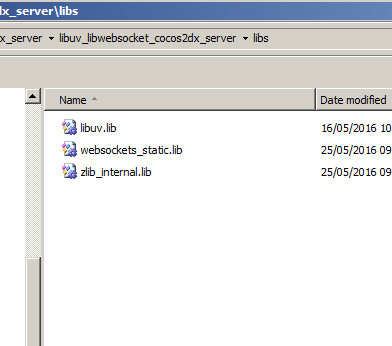
Create new directory called libs  also in the root directory
Into the libs directory copy the libraries we compiled in the previous steps (1 & 2) :
libuv.lib , websockets_static.lib , zlib_internal.lib

sources :

libs:


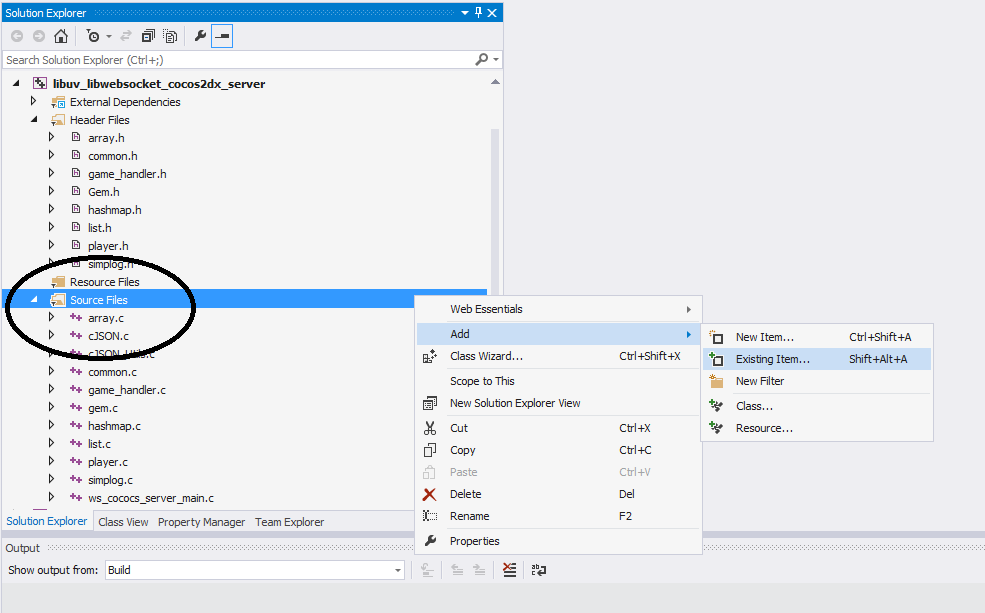
We now going to add all those libs + headers + sources files into our VS project .
Right click on the "Header Files" in the new created project in VS  go to :
Add -> Existing item
Browse to the new created project root directory  and select all the headers there


Do the same but now right click on the source directory in VS under the new project and add the C files :


You need also include the cJSON c file , so repeat the same process for the files: cJSON_Utils.c cJSON.c


Project configuration :
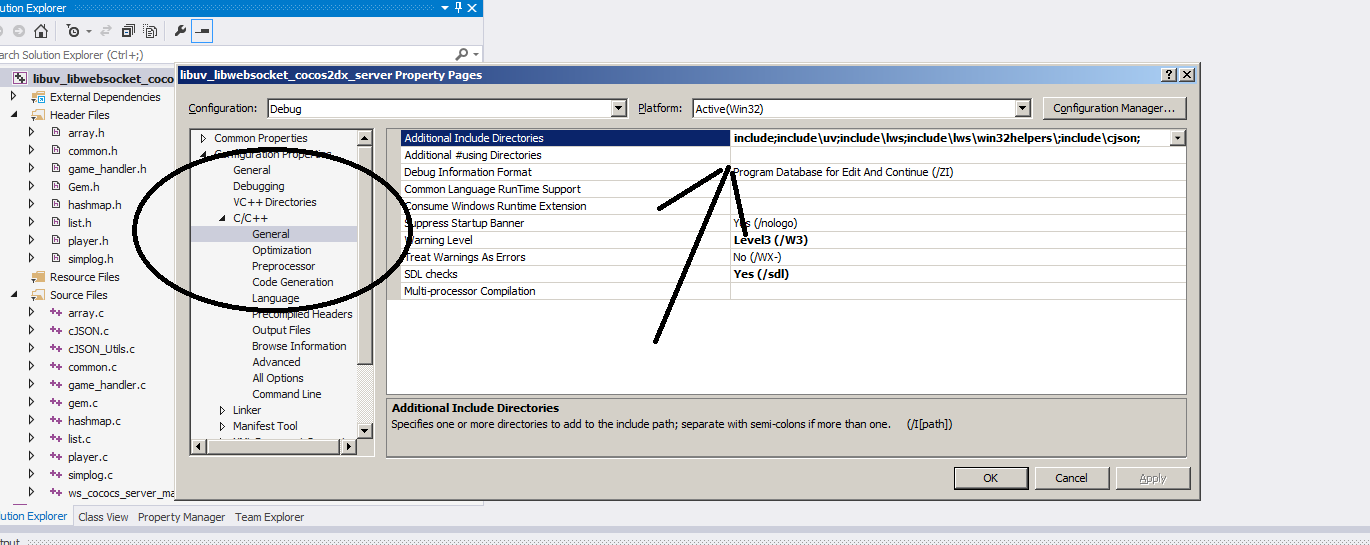
Right click on the project go to :

C/C++ -> General -> Additional include Directories :  add the headers path
include;include\uv;include\lws;include\lws\win32helpers\;include\cjson;


Then go to:
C/C++ ->  Preprocessor -> Preprocessor definitions

Verify you have those set :
WIN32
_DEBUG
_WINDOWS
_CONSOLE
_LIB
_CRT_SECURE_NO_DEPRECATE
_CRT_NONSTDC_NO_DEPRECATE

Then go to:
C/C++ -> Code generation -> Runtime library 


And verify it set to (/MDd) 


Then go to :
Linker -> General -> Additional Library Directories And add the libs directory we created in the previous step


Then go to :
Linker -> Input -> additional dependencies
And verify you have those library names ( this part will be different in Linux configuration )

advapi32.lib
iphlpapi.lib
psapi.lib
userenv.lib
ws2_32.lib
libuv.lib
websockets_static.lib
zlib_internal.lib


Then go to :
Linker ->SubSystem 
verify it set to  : Console (/SUBSYSTEM:CONSOLE)

That's all ! compile the project
You should see  build\Debug\libuv_libwebsocket_cocos2dx_server.exe  file create.

Go to PART 2 where we dive into the server source code